Posts

Showing posts with the label ford vcm ii

How to install Ford VCM 2 IDS V100 on VMware machine

Image
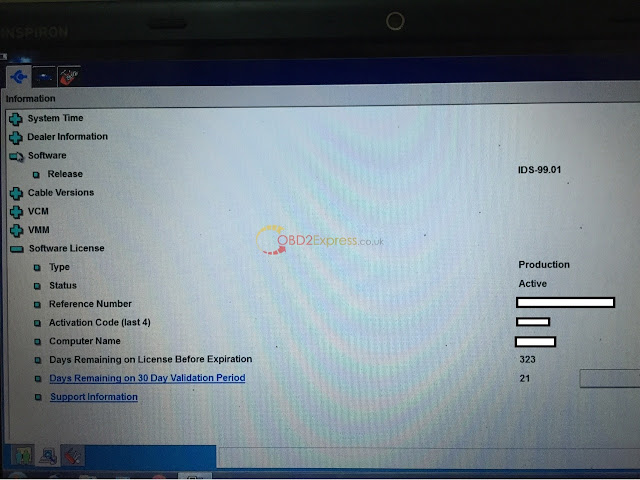
FORD IDS V100.01 for China VCM 2 is released. Here, you will be guided to free download and install the newest Ford software. Version: Ford IDS v100.01 Language: English, Spanish, Spanish(Mexico), French, French(Canada), German, Greece, Finland, Slovenia, Danmark ,Czechic, Chinese(Taiwan), Chinese(China), Amer English, Vietnam, Turkey, Thailand, Swedish, Russian, Portuguese, Portuguese(Brazil), Poland, Norwegian, Holand, Korea, Japanese, Italy, Indian, Hungary Device to work with: Ford VCM ii clone (tested VCM ii: item No. SP177    SP177-1    SP177-C   SP177-G ) NOTE: You may be risky to try on other vcm II devices. Operating system: Windows XP Windows 7 VMware Player Ford VCM 2 IDS V100 installation instruction: -Video guide -Guide via words 1.install VMware 2. install Windows XP Professional and VMware Tools 3. reset date and time on on VMware 4. install Calibration 5. install ids-v91.01_full 6. check if IDS-91.01 is success...
Mazda IDS 99 coming soon

Image
Mazda IDS 99.00 and 99.01 is developed right now. and here is the software we share with all to test on VCM 2 and VXDIAG VCX NANO for Mazda. free download IDS-99.01_Full.exe Mazda IDS 99.00.exe you can free download and try on the following products, but you maybe take risks to do this: VCM II clone (quality A) VXDIAG VCX NANO OEM Diagnostic Tool for Ford / Mazda VXDIAG MULTI Diagnostic Tool 4 in 1 here, we are pleased to learn your test results and will report our results by obd2express technicians for all.

VXDIAG NANO vs VCM II, Which better?

Image
Recently, many complained their confusion to buy a diagnostic tool for Ford or Mazda, for there is a full chip high quality VCM II for nearly 180$ (SP177-C) and there is the new VXDIAG VCX NANO for only about 100$. The price difference is ridiculous and sellers claim they both do the same thing. *similarity: clone vcm 2 & original vxdiag come with the  same software -->  thus the same function & vehicle coverage & language support & O/S requirement *difference: vcm ii - clone vs. vxdiag - original ( different factories--> different brands&firmware--> different price : vxdiag usually cheaper) different drivers *detailed similarities and differences - VCM II vs. VXDIAG NANO Products VCM 2 VXDIAG VCX NANO for  FORD/ MAZDA Diagram Differences Origina or not Clone Original Price  $180.83 $109 Drivers Drivers are installed when software install...

How to install Ford IDS V98 for WiFi VXM II

Image
Ford VCM 2 IDS V98.01 has been released officially at obd2express . And IDS 98.01 installation is offered here. IDS 98 only for Ford VCM II with wireless card: http://www.obdexpress.co.uk/wholesale/best-ford-vcm-ii-diagnostic-tool-wifi-wireless-version.html (best WIFI vcm ii) http://www.obdexpress.co.uk/wholesale/ford-vcm-ii-diagnostic-tool-wifi-wireless-2.html Operation system: Windows XP / WIN 7 Video instruction on IDS V98 installation: https://mega.nz/#!4tV3hLiC Main steps: Step 1 Install IDS V81 Step 2 Install and run IDS V91 Step 3 Install IDS V98 Step 4 IDS V98 test on Mondeo 2011 MY Step 5 Install Deep Freeze Detailed instruction: Disable network connection Go to Date and Time Properties/Internet Time, to cancel selection of "Automatically synchronize with an Internet time server" Step 1 Install IDS V81 Insert IDS V81 DVD , open RPU DVD. Click " Calibrations ". Click ‘"Next" to in install Calibrations. Click "Nex...

How to generate Ford Mondeo DPF with the VCM 2 IDS diagnostics tool

Image
Ford comes with activate DPF (diesel particle filter). Active regeneration of these DPFs is employed when the exhaust temperatures are too irregular for a passive system to regenerate consistently. Here is an instruction on generating Ford Mondeo 2005 DPF and recoding datastream with Ford VCM 2 IDS . Tools needed: Ford VCM2 IDS diagnostic system V86 / V91 / V94 (newest version) A laptop running Windows XP mode Well install Ford VCM ii software Connect the VCM II diagnostic tool with vehicle via OBD port or WIFI wireless connection Select function tab, then press Powertrain >> Service Functions >> PCM Check the function option under "Service Functions" menu, then click "EXIT" to select item for more information. Press the Tick mark on the right bottom. VCM IDS will display detail vehicle information, engine type, VIN etc Select control unit tab, select Powertrain >> Engine Turn ignition to ON position Select Equipped or Not Eq...