Posts

Showing posts with the label Audi diagnostic tool

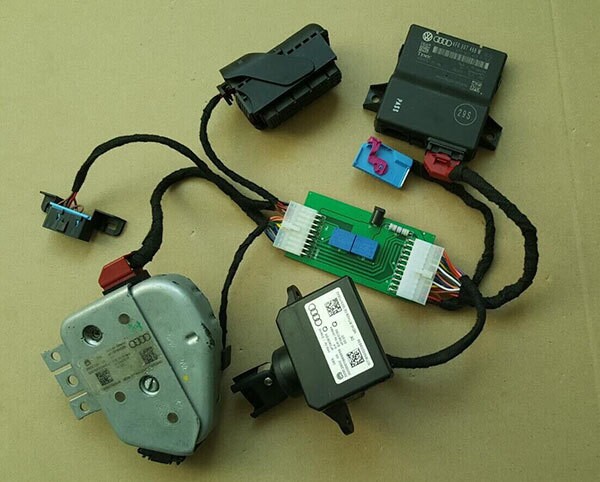
Audi J518 test cable work with VVDI, VVDI MB BGA Tool
Image
This is Audi J518 test cable available at obdexpress.co.uk which has been verified to work well with VVDI commander, and VVDI Benz key programmer. Functions includes: Work together with  VVDI key programmer /  VVDI MB BGA tool 2. Can do immobilizer online & component protection. 3. Can be used to connect J518 engine, gateway and instrument ignition switch Audi J518 test cable  in use: Audi J518 test cable package: Source: New J518 Test Line For AUDI Work With VVDI & VVDI MB BGA Tool

AUTOPHIX VAG007 VW/AUDI OBDII Scan Tool

Image
AUTOPHIX VAG 007 is a super scanner for detecting the Volkswagen Series and OBD II vehicles,It supports not only the KWP, TP-CAN and New UDS protocols, but also all OBD II protocols,It is small, light, handy and versatile, it gets data quickly. Top 6 Reasons to Get VAG007: 1. Delicate and Portable 2. Automatic Scanner System,easy to operate 3. Multilingual Menu: English, German 4. Economical and practical 5. Oil Reset for VW/AUDI 6. Fast diagnosis and get data quickly VAG 007 VW/AUDI OBDII Scanl Tool Compatible Vehicles:             VW/ AUDI/ SEAT/ Skoda/ Jetta/ Bora/ Santana/ Sagitar/ Magotan/ Golf/ Beetle/ Tiguan/ Touareg/ Passat and so on . VAG 007 VW/AUDI OBDII Scanl Tool Function: Read fault codes Erase codes and turn off the malfunction indicator light Retrieve vehicle information VW/AUDI Control unit info. Read fault codes Clear fault codes Oil reset TP Position check EPB ReplaceBrakepads OBD II function: Work on all af...

How to tell VAS 5054A Bluetooth by PCB

Image
Obd2express offers two types of VAS 5054A with different pcb, which support good or normal bluetooth function. Here is the tip for you all to tell VAS 5054A Bluetooth by PCB. Two different bluetooth module from two factories Good bluetooth function with A bluetooth module Source: http://www.obdexpress.co.uk/wholesale/best-vas-5054a-vw-audi-bentley-and-lamborghini-diagnostic-tool-oki-chip.html (high-quality 5054a) Normal bluetooth function B bluetooth module Source: http://www.obdexpress.co.uk/wholesale/odis-vas-b-5054-plus-oem-diagnostic-tool-oki-uds.html (normal 5054a plus) Tips of using 5054a via bluetooth connection The diagnostic base system can access the VAS 5054A via Bluetooth. After a connection via Bluetooth to the VAS 5054A has been set up, the Bluetooth software provides a virtual serial COM port (Bluetooth Serial Port Profile). The Diagnostic Base System uses this COM port to communicate with the VAS 5054A. You need to specify this port when you install ...

VAG VVDI V3.5.3 Update Error: Update programmer failed

Image
Symptom description: Original XHORSE VVDI VAG interface 3.5.2 prompt that “You must update your programmer to use this software. Do you want to update your programmer?”. Click Tak (Yes) to update VVDI VAG . But when updating vag programmer, error appears- “Update programmer failed.” How to update VVDI China VAG Vehicle Diagnostic Interface 3.5.3 ? Operating System: Win7 or Windows XP Note: This version need the newest firmware support -how to update VVDI firmware to the newest: 1. Use the update tool "Commander Immo Plus" (please contact us to send you) 2. Give us the serial number 3. We send you update file by email. 4. After receiving the software, import it into "commanderupdate v1.3" to update hardware. - how to update software VVDI vag 3.5.3: VVDI 3.5.3 software free download: http://www.chinaautodiag.com/download/vag-vehicle-diagnostics-interface-setup-v3.5.3.zip Tips on updating VAG VVDI Diagnostic Tool :  If your VVDI is not from ob...

VAS 5054a ODIS 2.2.6+ PostSetup 6.70.1 Win 7 installation

Image
VAG Volkswagen VAS 5054A ODIS diagnostic software for VW, Audi, Skoda, Seat, Bentley & Lamborghini is newly updated to 2.2.6 version with PostSetup 6.70.150. Here is the instruction on installing ODIS V2.2.6 on Windows 7 operating system. Software version: ODIS 2.2.6 + Postsetup 6.70.150+ free license Hardware: The new ODIS 2.26 software works with vas 5054 interface pass-thru SP33 , SP33-B , SP33-C and SP33-BO (NO SP33-D !!!) Operating system: Windows 7 (32-bit is better) ODIS engineering 2.2.6 software installation on Win 7: Main steps: Step1: Install Driver Step 2: Install ODIS software Step 3: Activate/Validate license Step 4: Mount PostSetup-6.70.150 Step 5: Activate ODIS 2.2.6 Step 6: Connect vas 5054 via USB Step 7: Bluetooth connection Step1: Install Driver Open ODIS 2.2.6 software CD Copy and paste Daemon-Tools-4.49.1356 zip file to desktop Unzip the file Open Daemon-Tools-4.49.1356 folder, mount “InstalGadget” and run as administrat...

How to install Multidiag Pro DS150E 2014.3V software

Image
Bluetooth MultiDiag Pro+ DS150E diagnostic interface for cars, truck and OBD2 software has newly updated to 2014.3V. Here is the step-by-step software installation guide. Software version: DS150E 2014.3V Operating system: Win XP (Most), Win 7 and Win 8 Hardware: Bluetooth Multidiag Pro with SN:100251 (Item No SP207 , SP207-B , SP207-C , SP207-D , SP207-E ) Language: English, Czech, Dansk, Dutch, Finnish, German, French, Greek, Hungarian, Italian, Norwegian, Polish, Portuguese, Romanian, Russian, Serbian, Spanish, Suomi, Swedish, Turkish Pre-installation caution: Disable network connection and disable anti-virus software program!!! Very important!!! Main Steps: 1.Install WINRAR 2.Install DSCars-R32013.exe 3.Install Microsoft.Net Framework 3.5 4.Activate DS150E 2014.03 software 5.Configure DS150E 2014.3 software 6.Update Multi diag pro firmware Diagnose with DS150E 1. Install WINRAR Open my computer Open DS150E 2014.3 software CD Open DS150E 2014.03 folder Op...