Update Scania VCI 2 or VCI3 SDP3 v2.27 truck diagnostics
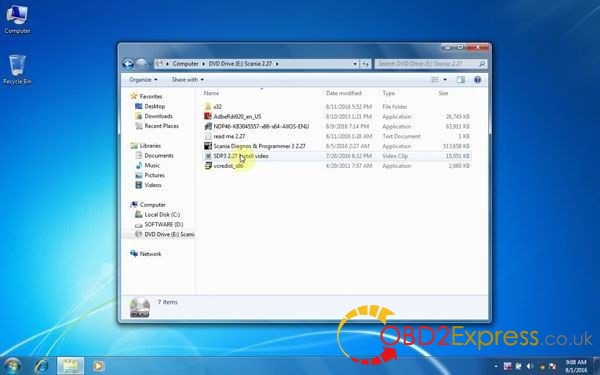
Scania VCI 2 VCI 3 software has updated to Scania Diagnosis and Programmer 3 SDP3 v2.27. Here is the instruction on how to install / setup Scania VCI 2 VCI 3 SDP3 v2.27 on Windows 7 32bit operating system. Step 1 - Read read me 2.27.txt to get the installation instruction Step 2 - Install AdbeRdr920_en_US.exe Step 3 - Install NDP46-KB3045557-x85-x640-allOS-ENU.exe Step 4 - Install vcredist_x86.exe Step 5 - Install scania Diagnosis & Programmer 3 2.27.exe Step 6 - Once finished, run x32 folder the “install.exe” Pass: 6426758 When required, allow install.exe to install driver Step 8 - Run Scania SDP3 2.27 program Run SDP3 configuration to setup language, authentication, interface and SDP3 update Language available: English, German, Spanish, French, Japanese, Dutch, Polish, Portuguese, Swedish, Norwegian, Suomi, Turkish, Italian, Czech, Russian. Run SDP3 Then you can use Scania VCI 2 SDP3...