Posts

Showing posts with the label launch x431

Autel vs Launch vs Xtool Truths Before You Purchase

Image
 Confused by Car Diagnostic Tools and Key Programming Tools ? Cut through the hype. This guide reveals the truth about top brands like Autel, Launch and Xtool to help you choose wisely — with specific recommendations at the end — so you can invest with confidence. Myth 1: Expensive Always Means Better Not necessarily. While high-end tools often come with more features, many affordable scanners and key programmers now offer functions that were once only available on devices costing thousands. You can find capable diagnostic tools around $300 that perform all-system scans, bidirectional tests, ECU coding, and even basic key programming functions. Myth 2: The Scanner Does All the Diagnosing False. The scanner is only as good as the person using it. Understanding automotive systems-like how to read fuel trim data-is what truly solves problems. Even a basic $50 diagnostic tool can provide valuable data, but it’s your knowledge that turns that data into a diagnosis. The ...
How to register & update Launch iCarScan VCI scanner

Image
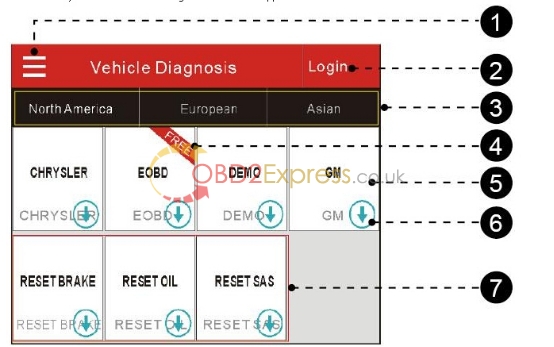
Launch iCarScan VCI Bluetooth Diagnostic Scanner is the perfect replacement of Launch iDiag auto diag scanner. Here is the instruction on how to register, activate and update/download iCarScan software. Launch iCarScan VCI Bluetooth Diagnostic Scanner User Manual http://www.obdexpress.co.uk/upload/pro/launch-icarscan-scanner-user-manual.pdf First of all, getting started with the iCarScan main function buttons: I. Download & Install the iCarScan App The iCarScan app is free to download. 1. Turn on your Android smart terminal.  2. Go into Android Play Store (Google play). Google play can be found in the following URL: https://play.google.com/store. 3. Input the keyword "ICARSCAN" in the search bar. 4. Once found, tap on "FREE" to download and install it. You are free to download 5 demo software. 5. After the installation is complete, an iCarScan icon will be created on the HOME screen. II. Register & activate Launch iCarScan software 1. C...

Part three to use the Launch X431 idiag

Image
15) LAUNCH X431 iDiag reenter the log in interface. Input the user name and password the the CC number you registered a moment ago, choose "log in" 17) After you successfully log in, choose "DBScar Register" 18) input the serial number and password of your device 19) where to get the serial and password. In the package, there is the paper. Serial number and password is shown on the paper. 20) after you register ready, you will see the serial number and password in the interface too. 21) choose the car model you want 22) next you will enter the page that prompt you to buy the software 23) choose the car model you want to buy 24)enter the purchase option in car diagnostic tool software

Set up the Launch X431 Vehicle Diag Scanner

Image
Once i enter the information over the blank, i satisfy the subsequent dilemma, it prompt me "Faid to sign-up connector, Dealer code is mistake ", I cannot go on and purchase the Launch X431 Vehicle Diag Scanner program, what should i do? Initial, use the ipad or iphone to register, never use your computer system. Next, stick to the manual, do the identical step. Third, in the event you however usually are not realize success, once you sign up the CC amount, give us your sign-up data (together with gadget details, password, and CC selection) along with your mail box. We will speak to launch corporation and sign up the gadget to CC selection. Then you can certainly right use this CC number to buy the car diagnostic tool software program.

Launch X431 Car Diag scanner set up error and option

Image
Description Just after you purchase the launch x-431 computer software from official launch internet site and use it, should you meet the following software installation trouble, please use in this way to resolve it. Issue description: Any time you set up the computer software, it prompt you "dealer code" trouble, what should you do? What brought on this difficulty and how to fix it? 1) You utilize the wrong strategy to use the computer software 2) Your telephone or ipad doesn't meet the normal Terminal Launch x-431 program necessities: For iphone, ipad, ipod touch, iOS model is five.0, or higher. Awareness: Don't register on laptop or laptop. Connected may be the user guide, please adhere to it to install and use the software program.