Posts

Showing posts with the label diagnostic software

How to program BMW ECU by ICOM A2 WinKFP
Image
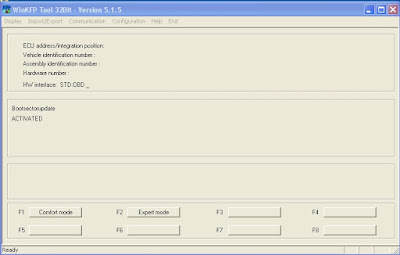
This is an instruction on how to update a BMW module with WinKFP software for  ICOM A2  emulator. 1 Start  WinKFP  and select F3:- Update ZUSB 2 Select ECU type and the ECU will appear along with a list of part numbers. 3 Select ok and the main menu will re-appear 4 Select VIN and enter the cars VIN no. and select OK. 5 Select Done 6 Select Prog. ZB_update, you will be asked to confirm the update, Winkfp wil state the number of times the module can be re-programmed. 7 Sit back and wait. I did my TCU with my cars VIN no. and it took 35 minutes over the OBD port. Original: http://blog.obdexpress.co.uk/2016/09/30/icom-a2-winkfp-program-bmw-ecu-module-tcu/
Free download WinOLS v1.721 v1.500 (no need activation)

Image
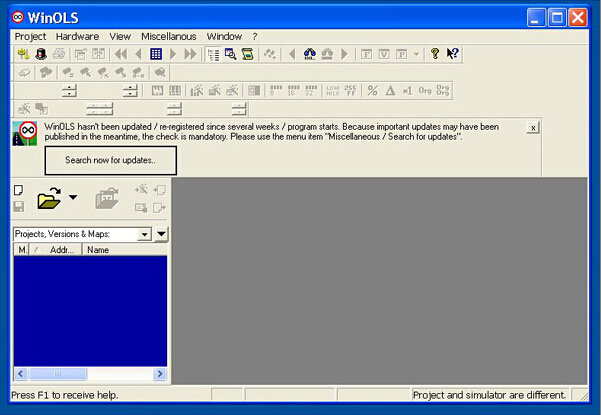
Here, you can free download WinOLS version 1.500 and v1.721 to modify the memory contents of ECUs that all data and maps are stored in project files. Where to get WinOLS? [free] WinOLS v1.721 with unknown security https://rapidshare.com/files/546425337/WinOLS_1.721_Setup.part1.rar https://rapidshare.com/files/524736303/WinOLS_1.721_Setup.part2.rar https://rapidshare.com/files/3041142174/WinOLS_1.721_Setup.part3.rar https://rapidshare.com/files/3630163119/WinOLS_1.721_Setup.part4.rar [free] WinOLS version 1.500 with unknown security https://mega.nz/#!Qh9GTZTK!_srZ_LS0ODKkwXrWWHVlk0z8KJmfV4gunAS8zQFH35c [safe, never expires] working WinOLS v1.500 http://www.obdexpress.co.uk/wholesale/winols-version-1500-with-unlock-patch.html (WinOLS Version 1.500 with unlock patch, it can be replicated with no activation. ) What is Winols ? WinOLS is an application, which is written especially to modify the memory contents of Engine Control Units (ECUs). It makes it easier to search and...

How to update your BMW ICOM firmware to the newest version

Image
The newest BMW ICOM firmware version has been released, obdexpress.co.uk technician can offer the icom firmware update file and instruction to help you update ICOM A1/ A2 system & application to the latest version fit for newest Rheingold 2015.11 icom software, which is a must to update the ICOM firmware to the latest; otherwise, it would fail to diagnosis or do programming on BMW vehicles. Latest firmware version of icom a1 a2: ICOM-PF-CORE 03.14.03 ICOM Application-01.40.05 ICOM Boot-01.25.02 How to update your BMW ICOM firmware to the newest version? Preparation: 1. ICOM A A2 diagnostic tool (make sure of your ICOM version, common version or super/perfect version) 2. Laptop with Win 7 Win 8 3. Free download ICOM A A2 firmware update files (pls contact sales@obdexpress.co.uk for more details): ICOM-ApplicationImage-01-40-05.bin ICOM-BootImage-01-25-02.bin

BMW ICOM can’t connect/ detect cars with start button

ICOM A1 3.39 ISTA version native (not vmware) and work perfect with most bmw cars, but I have a problem with new cars with start button, they don't detect the ignition status. On bmw car with key start, the icom full can be used for all functions like programming, coding, diagnosis... all work well, but on cars with start button is impossible to connect it and don't detect the ignition. Easy way to check if it's hardware or software. Connect the ICOM to another PC via LAN. While plugged into the OBD port of the car, connect a charger to prevent battery drain. Access the ICOM manager in internet explorer (requires adobe flash) by typing the ip address (http://169.254.x.x:60080) use ITool radar to obtain the I.P address of the ICOM. ICOM clones usually  http://169.254.92.38:60080  will work. You will be presented with a screen to enter a user name and password. Username is  root Password is  NZY1150263 Hope this helps

How to install the software for Mitchell OnDemand 5 Q1.2012

Image
Description This is the  car diagnostic tool software installation for Mitchell OnDemand 5 Q1.2012. Here you can use this way to install the software and use it succesfully. Before you install this software, please make sure that you have closed or uninstalled the unti-virse software. Otherwise this Mitchell OnDemand 5 will be deleted by unti-virse software. Attention: Our software does not have virse. All the files should be uploaded to "120%". 1) Install "Alcohol 120%" After you restart the computer, please copy the serial number: ALCBCBCBCBC3T99TVJKK2G7XYBCVWDDB2MPCDR78YCDB2CCB289RTK234CD7MG7D43TC3M392C34V89T8DFJKBBT8MPMPQ6T8BB233HCDXXCCBCBCB 2) Install Mitchell Open Mitchell\M582, choose "setup.exe" to install the software 3) choose "Next" 4) Choose "i accept .... " and "next". 5) Now please wait 6) Now click "finish", then this software is finished. 7) Close mitchell procedure 8) The ...

R270 BMW CAS4 BDM Programmer softwre free download

Image
Description R270 BMW CAS4 BDM Programmer file download. Cost-free download: R270 BMW CAS4 BDM Programmer application link: http://www.mediafire.com/?f5jjhzmnfyxrcku Please get simple to download our readily available attachments, these downloading website link don??t consists of attacking virus,they are protected for your cumputer. In case the anti-virus software package test any of our attachment (specifically .exe .zip .rar) containing virus,consider straightforward, please uninstall or exit anti-virus software package ahead of download files, otherwise these .exe .zip files might be attacked/broken in advance of you run them. R270 BMW CAS4 BDM Programmer cable instruction: In the event you seem on the consumer manual and you also come to feel confused together with the cable, here i will give you some explaination for your cable. Seem at this photo, the tiny cable with yellow mark is cable 1, as well as subsequent one particular (green) is cable 2. You will discover 26...

Fatal Error during the set up of Autocom CDp Pro

Image
When I install the auto diagnostic tool software program, I meet the next error. I have put in the software package 2011.3, but I are unable to open it. When I open the computer software, it gives me the next prompt. Is this the trouble of the software? Or there may be some thing incorrect in my installation measures? I really need to fix it. Issue shown: This problem exists with your set up techniques. Solution1: Please set up the update during the 2011.3 program Remedy 2: Delete the files: C:\Documents and Settings\All Users\Application Data\ autocom .