Posts

Showing posts with the label VAS 5054A

VXDIAG VCX NANO 5054 odis 3.0.3 vs VAS 5054A odis 3.0.1 vs 5054 plus

Image
This table here is aimed to clarify differences among wifi VXDIAG VCX NANO 5054 odis 3.0.3, VAS 5054A odis 3.0.3, 5054 plus odis 3.0.1. Product Name VXDIAG  VCX NANO 5054 VAS 5054A VAS 5054 Plus Picture Price €72.50 €93.00 €90.00 Original Yes, it’s  original No, it’s Chinese copy No, it’s Chinese copy Software Version ODIS V3.03 ODIS V3.0.1 ODIS V3.0.1 Update Update via download link via CD/email via CD/email Operation System  WIN 7 32 bits / WIN 7  64 bits Windows 7 32bit Windows 7 32bit Language English/Japanese/Portuguese/ Romanian/Korean/Dutch/Polish/ Turkish/Spanish/French/Italian/ Croatian/Danish/German/ Swedish/Finnish/Slovenian/ Czech/Russian/Greek/Chinese English/Japanese/Portuguese/ Romanian/Korean/Dutch/Polish/ Turkish/Spanish/French/Italian/ Croatian/Danish/German/ Swedish/Finnish/Slovenian/ Czech/Russian/Greek/Chinese English/Japanese/Portuguese/ Romanian/Korean/Dutch/Polish/ Turkish/Spanish/French/Italian/ Croatian/Danis...

How to solve VAS 5054A Software installation problem

Image
VAS 5054A has two kind software. One version is ODIS software, the other version is V19 software. ODIS software now we have V2.27, V2.23, V2.03 and V2.0 version. They are good at new cars. Old V19 software is better for old cars. V19 also has english, german and other language. Here is some problem our customers meet in software installation. If you meet this problem also, please use these solution to solve your problem. problem I install the software on computer, but cannot search VAS 5054A via bluetooth, what happened? I check bluetooth, it work 100%, but i cannot connect the device with the car, and the light is off. Solution: When you use USB to connect the VAS 5054A with computer, then do not use bluetooth. There are two ways for connection: USB cable and Bluetooth. You can choose one way to use this tool, not both at the same time. This is the wrong place for your operation. problem When i install V19 german software, it asks for a username and a password. I can i...

How to tell VAS 5054A Bluetooth by PCB

Image
Obd2express offers two types of VAS 5054A with different pcb, which support good or normal bluetooth function. Here is the tip for you all to tell VAS 5054A Bluetooth by PCB. Two different bluetooth module from two factories Good bluetooth function with A bluetooth module Source: http://www.obdexpress.co.uk/wholesale/best-vas-5054a-vw-audi-bentley-and-lamborghini-diagnostic-tool-oki-chip.html (high-quality 5054a) Normal bluetooth function B bluetooth module Source: http://www.obdexpress.co.uk/wholesale/odis-vas-b-5054-plus-oem-diagnostic-tool-oki-uds.html (normal 5054a plus) Tips of using 5054a via bluetooth connection The diagnostic base system can access the VAS 5054A via Bluetooth. After a connection via Bluetooth to the VAS 5054A has been set up, the Bluetooth software provides a virtual serial COM port (Bluetooth Serial Port Profile). The Diagnostic Base System uses this COM port to communicate with the VAS 5054A. You need to specify this port when you install ...

VAS 5054A ODIS 2.2.3 and Postsetup 6.2.2 Free download

Image
VAS 5054A ODIS /VAS-PC diagnostic software for VAG group (VW, Audi, Skoda, Seat) has released to the current V2.2.3. Here are the free download resources of ODIS V2.2.3 and ODIS-E Postsetup 6.2.2. Computer Requirements: -O.S.: Windows XP; Windows Vista; Windows 7 -CPU: Pentium/Athlon 1 GHz or higher -RAM: 512 MB of system memory -Hard Drive: 60 GB of available space -DVD-ROM Vas 5054a ODIS (Offboard Diagnostic Information System) V2.2.3 crack http://www.mediafire.com/download/mcfkqzivz7zdv5r/Odis.2.2.3.crack.zip Vas 5054 ODIS-E Postsetup engineering software 6.2.2 http://www.mediafire.com/download/747r93zb0orm44z/ODIS-E_6.2.2.rar NOTE: We are not responsible for the free download crack and postsetup. If you need legal and save ODIS 2.2.3 software, please order here. ( http://www.obdexpress.co.uk/wholesale/odis-software-vas-5054a-multi-languages-stored-u-disk.html ) VAS 5054 ODIS 2.2.3 Video Instruction http://www.dailymotion.com/video/x2lj08d VAS 5054...

Pair vas 5054a ODIS Bluetooth and change Bluetooth PIN

Image
VAS 5054A ODIS with OKI Chip for VAG group VW AUDI SKODA SEAT (support UDS Protocol) updated to the latest 2.23 with Bluetooth. Following are the instructions on pairing vas 5054 Bluetooth and changing Bluetooth PIN. How to pair vas 5054a ODIS interface Bluetooth? 1.Connect vas 5054 cable into computer via USB port, wait the system to found “Found New Hardware” 2.Double click the Bluetooth icon at the button corner of your computer. Then a dialog icon will appear below, click “Add” 3.Click Next 4.Wait the system to detect Bluetooth device, select “ vas5054 ” 5.Choose “Use the passkey found in the manual” and enter Bluetooth password, click Next 6.Installing Bluetooth device 7.Adding Bluetooth successfully, click Bluetooth COM PORT, must be set to COM4 8. Pairing Bluetooth is completed. Click “OK” NOTE: How to check which COM port is assigned to my VAS 5054A ? If you are using the Bluetooth software supplied with Windows XP Service Pack 2, open the Blueto...

VAS 5054A Audi VW V2.2.3 ODIS software installation

Image
VAG VAS 5054a Bluetooth diagnostic scanner ODIS software has upgraded to current V2.2.3 (2.23) version that works on Volkswagen and imported VW& Audi models. Following is the detail V2.2.3 ODIS installation instruction on Windows 7 operating system. Operating system: Win XP/Win 7 1)Create new folder Open My Computer>>D:// Create a new folder and name it “audi-vw-odis2.2.3” Copy “VW audi ODIS2.2.3.part1” setup and paste it to the new created folder Eject DVD Driver (F:) you will get VW audi ODIS2.2.3.part2, copy it to the new created folder Eject DVD Driver(F:) again, you will get AUDI-VW ODIS2.2.3 license and part3 setup, copy both of them to the new created folder Check the filer that contains these four files Select AUDI-VW ODIS 2.2.3 part1.past2 and part3, extract them to a folder and rename the folder “ODIS 2.23” Cut AUDI-VW ODIS 2.2.3 part1.past2 and part3 2) Install vas 5054 ODIS setup Open My Computer >>D://>> “audi-vw-odis2.2.3”>>...

VAS 5054A diagnostic tool Usage

Image
I put in the software program on pc, but can't lookup VAS 5054A by using bluetooth, what happened? I look at bluetooth, it perform 100%, but i can't join the unit with the car or truck, and the light is off. Resolution: Once you use USB to attach the VAS 5054A with pc, then will not use bluetooth. There are 2 techniques for connection: USB cable and Bluetooth. You may choose a person method to use this tool, not both equally simultaneously. This is actually the mistaken spot for your procedure. How you can use bluetooth to connect the VAS 5054A ? 1) Connect the system using your auto, then you will see the blue mild is flashing. 2) Join bluetooth adapter along with your computer system. There will certainly be a bluetooth emblem within the base correct corner of laptop. (There should be this emblem, keep in mind to install the bluetooth program) 3) Match the bluetooth because the instruction while in the package

VAS 5054A diagnostic device set up with XP procedure

Image
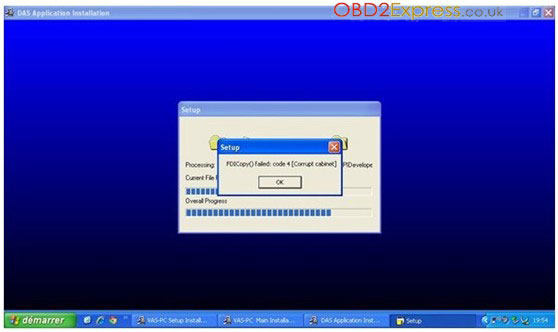
Challenge: After i set up the VAS 5054A software program on XP procedure. It prompt this problem: FDICopy() unsuccessful: code 4 [Currupt cabinet] Challenge cause: This really is the system dilemma of one's personal computer. Alternative: Modify one more computer system with XP method. Be sure the format of C is ntfs. Normally you might satisfy this issue with set up of VAS 5054A . Much more Car European programmer at http://www.obdexpress.co.uk/wholesale/car-ecu-programmer/

Ways to match the bluetooth of diagnostic scanner together with the vehicle?

Image
Description Here may be the instruction for how you can match the bluetooth of diagnostic scanner with all the car or truck. For some car diagnostic tool with bluetooth, for example VAS 5054A, ELM327 and so forth. Prior to you utilize the bluetooth, you'll need to match the bluetooth with your automobile initially. How? Here will be the comprehensive instruction: 1) When you match the buuetooth, connect the device along with your automobile to start with Focus: a number of our items has bluetooth adapter, some won't. If the product or service you purchase has the bluetooth even though will not have bluetooth adapter, then please invest in 1 to implement. For many on the products on our webiste whith has bluetooth function, they've bluetooth adapter. 2) How to match the bluetooth, please see the consumer instruction of VAS 5054A . 3) In case your laptop or computer has bluetooth, you then tend not to need to have bluetooth adapter There exists a bluetooth icon ...

Ways to results put in VAS 5054a

Image
When some customer set up the software program of VAS 5054a , the pc will prompt the condition of unsuccessful code 4 (corrupt cabinet). It's demonstrated as being the adhering to picture. Precisely what is the rationale? This issue is due to your pc. VAS 5054A computer software ought to be installed to the personal computer with XP functioning program. In case your pc is not XP technique, then it should end in this problem. Solution hyperlink: http://www.obdexpress.co.uk/wholesale/vas-5054a-vw-audi-bentley-and-lamborghini-multi-language-diagnostic-tool.html

Получите о Опытные VAS 5054A Особенности и обновления

Image
VAS 5054A , как правило, последовательность автомобиля диагностические инструменты, они точно так же оборудовании, но их программное обеспечение отличается в диск. Этот автомобиль диагностический инструмент легко URL среди персональных компьютеров и автомобилей, поскольку он имеет Bluetooth , оно может быстро рассмотреть положение транспортного средства.   VAS 5054A поддерживает многие виды языках, таких как : английский, немецкий , русский, испанский , чешский, французский и голландский . VAS 5054A часто является специалистом автомобиль диагностический инструмент для автомобилей VW, Audi , Seat, Skoda. VAS 5054A обладает мощными функциями, как он может читать и стирать коды ошибок ECU , как Check Engine , ABS, SRS, процедуры передачи , радио, отопление. Переверните взгляд на двигатель от мягкого и таким образом дальше. VAS 5054A обновляется на компакт-дисках , и VAS 5054A V17/V18 все активировать , покупатель должен постав...