Posts

Showing posts with the label ford diagnostic

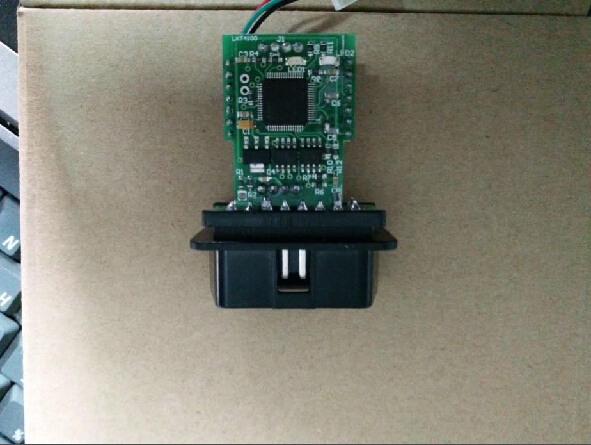
Ford OBD2 Odometer Correct Immobiliser Key Programming Tool tests results
Image
Ford OBD2 Tool is a newly released lightweight and friendly OBD device in obdexpress.co.uk . It can read and write into EEPROM file, it can read out immo code, and directly edit key position byte, then replace the original key to a new key, also it can read out and write into the synchronized bytes of instrument and engine, then directly synchronize without programming. Ford OBD Tool language available: English and Chinese. Tested tool: Ford OBD Tool high-quality printed circuit board Here is the test result about the FORD OBD TOOL . Tested function: Km change; Key program Tested vehicles: Focus 2005…km change ok Focus 2009…key program ok Focus2 Restyle 2008…km change and key program ok Focus3 2011…key program ok C-Max 2008…key program ok C-Max color 2008…key program ok C-Max 2012…key program ok S-Max 2006…km change ok S-Max 2012…key program ok Galaxy 2006…key program ok Galaxy 2007…key program ok Galaxy 2013…km change ok Galaxy 2014…km change ok ...

How to install Ford IDS V98 for WiFi VXM II

Image
Ford VCM 2 IDS V98.01 has been released officially at obd2express . And IDS 98.01 installation is offered here. IDS 98 only for Ford VCM II with wireless card: http://www.obdexpress.co.uk/wholesale/best-ford-vcm-ii-diagnostic-tool-wifi-wireless-version.html (best WIFI vcm ii) http://www.obdexpress.co.uk/wholesale/ford-vcm-ii-diagnostic-tool-wifi-wireless-2.html Operation system: Windows XP / WIN 7 Video instruction on IDS V98 installation: https://mega.nz/#!4tV3hLiC Main steps: Step 1 Install IDS V81 Step 2 Install and run IDS V91 Step 3 Install IDS V98 Step 4 IDS V98 test on Mondeo 2011 MY Step 5 Install Deep Freeze Detailed instruction: Disable network connection Go to Date and Time Properties/Internet Time, to cancel selection of "Automatically synchronize with an Internet time server" Step 1 Install IDS V81 Insert IDS V81 DVD , open RPU DVD. Click " Calibrations ". Click ‘"Next" to in install Calibrations. Click "Nex...

How to reprogram PCM for Ford Focus 2008 with VCM2 IDS

Image
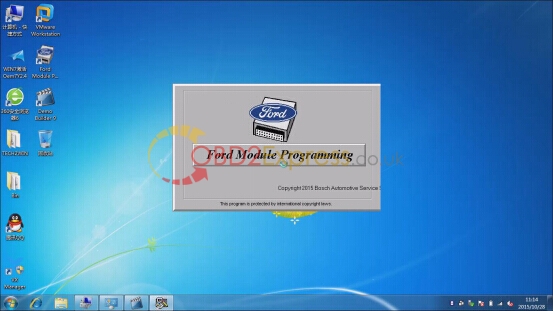
Here is the instruction on Ford Focus 2.8L 2008 PCM reprogramming using Ford VCM II IDS diagnostic system clone. Main procedure: Step 1: Install a new PCM Step 2: Reprogram PCM Step 1: Install a new PCM Install VMware and well setup IDS software follow the video/pdf guide (see attachment below) Run Ford Module Programming Click on car icon Select “Start New Session” Press “Confirm” The SAE J2534 pass-thru device cables must not interfere the safe operation of the vehicle. Secure all cables away from the vehicle pedals. Make connection as shown Turn ignition to ON Apply the parking brake Apply Neutral/Park gear position Establishing communication to PCM Verify vehicle information Press programming icon Select “Module programming” Select “Programmable Module Installation”>> “PCM” Again verify vehicle information and confirm Turn ignition to OFF position (Position 0) Check if the displayed VIN is correct, if yes, hit Yes to continue Follow the ...