Posts

Showing posts with the label car diagnostic tool

How to change language in Lexia3 PP2000 DiagBox v7.76 v7.77

Image
It’s a customer share of changing language in DiagBox, Lexia and PP2000. The user has tested on v7.76 and v7.77, and this is how to do it: Note: This is for educational and experimental use, and I hold no responsibility for any improper usage or damage to your system.. For  DiagBox 7.76  / 7.77: 1- Open the File Explorer and navigate to "C:\AWRoot\dtrd\trans\", find the file "Language.ini" and create a copy "Language.ini.org". Open the file Language.ini and under [LANGUAGE], change "Current=en_GB" to "Current=fr_FR" and save (I commented the original and added the new line to change from English to French). [LANGUAGE] ;Current=en_GB Current=fr_FR For  Lexia 3 : 2a- Navigate to "C:\APP\LEXIA\EXE\" find the file "langue.ini" and create a copy "langue.ini.org". Open the file "langue.ini" and under [DicoMap], change all "%LG%" to FR (I commented the original 4 lines and added chan...

OPCOM v1.59 program Remote Central Locking to Astra Mk4

Image
Just managed program a NEW REMOTE CENTRAL LOCKING BOARD to the Astra Mk4 WITHOUT ALARMS via  OPCOM V1.59 . I used: a NEW remote central locking board; i mean PCB a key for Astra Mk4 security pass for Mk4 a working  Op-Com  interface (hardware v1.59) working software  VAUX-COM 120309a Here is what i did: (thanks for sharing in forums) 1. Insert the NEW remote central locking board into the key. 2. Put the key into the ignition and turn so the battery lights etc come on, DO NOT START THE ENGINE. 3. Connect opcom to the car. 4. Start up opcom and click on DIAGNOSTICS. 5. Select year of car. 6. Select model of car. 7. Select BODY from the menu. 8. select CENTRAL DOOR LOCKING from the menu. 9. Select PROGRAMMING on the right hand side of the screen. 10. Select SECURITY CODE from menu (this should be the only one available at the time). 11. Enter the SECURITY CODE and click OK. 12. Select PROGRAMMING REMOTE CAR KEY from menu. 13. ...

V3.84 VDM UCANDAS Wireless Diagnosis System for Android released

VDM UCANDAS Newly Add to support Android, If users have bought UCANDAS before, can use Android phone or pad to connect wifi to update directly. VDM UCANDAS for Anroid Update Feature: 1. Supporting Andriod 4.0 or newer 2. Supporting screen resolution: above 720P 3. Supporting English language at the moment. As for multi-language. 4. Supporting read code, version information, clear code, live data. Special functions will be released later 5. More update coming soon. Notice: 1. Dealer Code: 000000 or 111111 2. Please Don't Use VDM UCANDAS on Windows XP SP2 System, Or Wifi Function Can't Work 3. If you bought Russian,German, French, Italian and Portuguese language, you need to update the software before you use Free download UCANDAS  for Anroid Free download UCANDAS V3.84 software V3.84 software update: 1. Add wave graph option for data list. 2. Add record and replay option for data list. 3. Optimized UI text under Chinese-traditional. 3. Optimized SETTING ...

Which TCS CDP pro+ 2014R3/ 2015 R3 should i choose? [PCB photos]

Image
Here are all versions of Chinese TCS CDP pro+ with cracked 2014.3 or 2015.3 software and 5.00.8 software at http://www.obdexpress.co.uk/search/?q=TCS . Read the post here and get the version you really indeed. Basic info: Good quality 2015.3 TCS CDP+ PRO Diagnostic Tool is a quick and reliable diagnostic tool serving as a link between computer and vehicles - old and new cars & trucks. CARS & light vans: 1988-, a total of 47 different brands light and heavy commercial vehicles, buses and trailers: 1995-, a total of 37 different brands The diagnostic program GENERIC is designed for the legislation based diagnostics, specially targeted for emission related fault codes. GENERIC is included in CARS and TRUCKS packages. Multiplexer function, 2xHS CAN (ISO 11898-2), SW CAN (SAE J2411), K/L (ISO 9141-2), VPW (J1850), PWM (J1850), RS485 (J1708), TTL and (SPI, analog in, 5volt out). Newest TCS CDP pro 2015.3 with Bluetooth  (€52.00) http://www.obdexpress.co.uk/wholesal...

FREE download VEPCKER Easydiag v8.1 - add BATTERY CONFIGURATION

Image
Bluetooth WIFI VEPCKER Easydiag v8.1 has been released at obdexpress.co.uk . Free download the latest VEPCKER v8.1 software and get the update news here. Free download VEPCKER setup v8.1: http://www.vpecker.com/download/vpecker_setup_v8-1/ Version: V8.1 Update online Operating System: Windows XP, Windows 7, 8, 10 VEPCKER v8.1 update info & new features: 1- add important functions like "Maintenance Service System", " Feedback", "Data Management" etc. 2- add BATTERY CONFIGURATION in"Maintenance Service System" ("MSS") Maintenance service focus on daily maintenance special functions, such as Oil reset, EPB, TPMS, ABS Bleeding, DPF, ETS, Injector, Battery configuration(newly-added), etc. 3- find your screen shot and downloaded Application in the Data Management section 4- easy to contact the engineer from "Feedback" section for technical support 5- NEW CARS' DATA has been added to the software's...

JDiag Elite J2534 Software Quick Start Guide

Image
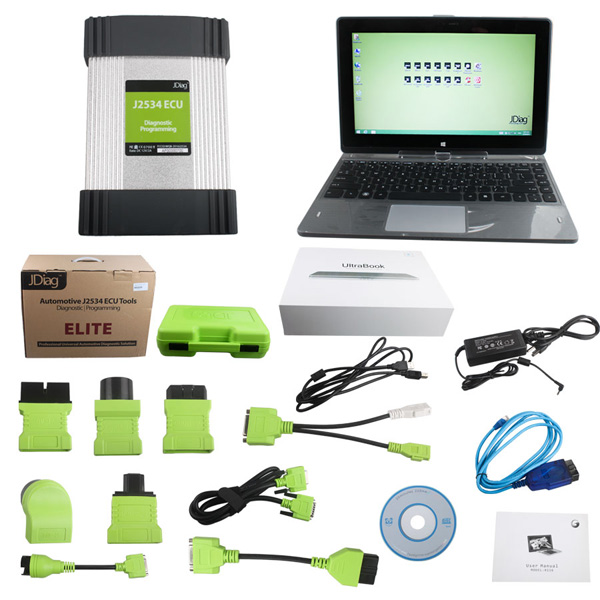
JDiag Elite J2534 Diagnostic and Coding Programming Tool support Multi-diagnostic tool & wide vehicle coverage,three operation systems for you to choose. Here we come to the software OS choose screen, there are total 3 operation systems inside JDiag laptop, each one for different brands, choose anyone you want to work with. 1.ODIS| Techstream| Forscan| HDS| JLR| GDS2| Consult III+|Subaru 2.ISPI NEXT 3.Xentry Passthru Operation System 1:ODIS| Techstream| Forscan| HDS| JLR| GDS2| Consult III+|Subaru Software included Operation System 2:ISPI NEXT Software included Operation System 3:Xentry Passthru Software included Note: The operation system 3 which with automatically recovery function please don’t put any important files or database on this system, we strongly recommend you save your data to USB sticky. VEHICLE LIST: JDiag Elite J2534 is compatible with many brands cars all over the world, and more brands is still under developing. List brands are tes...

How to diagnose Mercedes Benz W211 with jDiag Elite J2534

Image
This post mainly display how to step-by-step diagnose Mercedes Benz W211 with Jdiag Elite J2534 . What is Jdiag Elite J2534 ? JDiag Elite J2534 made by JDiag Inc is a diagnostic and coding programming Tool, it is the new generation J2534 tool. It can perform module programming, diagnostic functions, key programming and data monitoring. It is built with JDiag Tablet touch screen. It features in the  pre-installed software and free update for life time. It is compatible with 3 optional operation systems including WIN7,64Bit; WIN8.1,64Bit, and when you turn on the PC, you are supposed to choose a system and all are preinstalled. To check the similarities and differences among JDiag Elite J2534 and other multi-brand diagnostic programming tools e.g AUTOBOSS V30 ELITE , LAUNCH X431 V and Autel MaxiSys Pro MS908P , browse: http://www.obdexpress.co.uk/upload/pro/jdiag-comparison-obdexpress.co.uk.pdf Step-by-step to diagnose Benz E-class/CLS W211 with JDiag Elite J2534 : 1....