Posts

Showing posts with the label Xhorse VVDI

VVDI MB BGA Tool Firmware Software Update

Image
Original VVDI MB tool v2.0.5 has been released! But how to update vvdi mb software 2.0.5 correctly? Firmware update first!!. 1. How to update vvdi mb tool firmware The program will read the newest software version from server automatically Update firmware steps: 1) Connect VVDI – MB TOOL to PC with USB cable 2) Choose VVDI – MB TOOL firmware version from Firmware List 3) Press button Update Online, wait the progress for about 3 minutes 4) If failed to get firmware list or get something like “communicate with server error!” while update your device, close antivirus and firewall programs, try again. Change your internet provider once failed again 5) DON’T shutdown your PC or disconnect USB cable while update device Reflash Firmware List Update Online Tool will connect to server automatically and download the newest firmware information. You can press reflash picture button if there’s no display. After you get information success, will display current support firmware list...

VVDI MB BGA Tool 2.0.2 Free Download

Image
(Dec. 16th, 2015) Original VVDI MB BGA key programmer 2.0.2 is released. Here, obd2express offer software download. Free download vvdi mb tool 2.0.2: https://www.dropbox.com/s/906ornm7675sun0/SK185%20VVDI%20-%20MB%20TOOL%20V2.0.2.rar?dl=0 Contents included: Update information: *** 2015-12-14 Require firmware V2.0.0 ===== BENZ V2.0.3 ===== 1. Password calculation: Read EIS under OBD mode will check car power automatically. Avoid lost data in EIS. *** 2015-12-13 Require firmware V2.0.0 ===== BENZ V2.0.2 ===== 1. Support prepare key file with v11 format *** 2015-12-12 Require firmware V2.0.0 ===== BENZ V2.0.1 ===== 1. VVDI-MB TOOL released verison 2. For the detail please view user manual(Menu->Options->User Manual) *** Test Version VVDI-MB TOOL V1.0.3 Public test version VVDI-MB TOOL V1.0.2 Beta test version VVDI-MB TOOL V1.0.1 Beta test version Read more about vvdi mercedes tool, please g to: http://www.obdexpres...

How to use PCF79xx-ADAPTER-V12 for VVDI PROG 4.1.2

Image
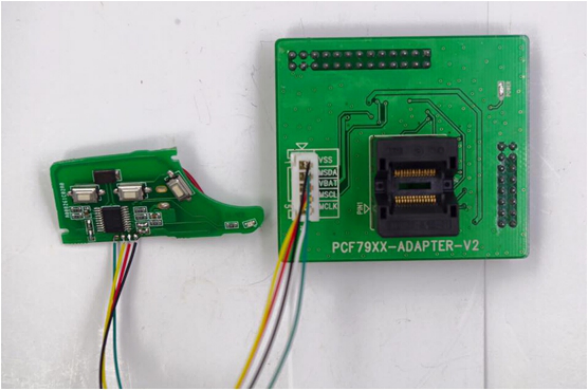
Tips of using PCF79xx-ADAPTER -V12 for VVDI PROG PROGRAMMER V4.1.2 are offered at obd2express . Adapters here included: PCF7941 PCF7952 PCF7953 PCF7945 PCF7922 PCF7961 How to: Put the chip in the IC socket. Connect the pins of the chip accordingly as the connection diagram shows. PCF7941 PCF7952 PCF7953 PCF7945 PCF7922 PCF7961 See more vvdi prog v4.1.2 wiring diagram, please go to: http://obd2-diag.blogspot.com/2015/12/vvdi-prog-412-car-ecu-wiring-connection.html

How to online update xhorse VVDI2 Key Programmer

Image
New VVDI2 Tool is new generation VVDI interface, VVDI2 program can get the latest software version from server automatically online, and the main upgrade step is showed as following. Operating system:  Windows XP Language: Chinese/ English Update firmware steps: 1)Close other VVDI2 programs, connect VVDI2 to PC with USB cable 2)Choose VVDI2 firmware version from Firmware List 3)Press button Update Online, wait the progress end 4)If failed to get firmware list or get something like “communicate with server error!” while update your device, close antivirus and firewall programs, try again. Change your internet provider once failed again DON’T shutdown your PC or disconnect USB cable while update device 1.1. Refresh Firmware List Update Online Tool will connect to server automatically and download the newest firmware information. You can press flash picture button if there’s no display. After you get information success, will display current support firmware list,...

XHorse VVDI PROG Programmer V4.1.0 Update and free download

Image
VVDI PROG programmer V4.1.0 has been updated on Nov. 13rd, 2015. Here is the information about the new VVDI PRO V4.1.0. VVDI PROG 4.1.0 free download: http://www.mediafire.com/download/y2nyr5pu2zynxto/VVDIProg4.1.0.zip What’s new in VVDI PROG V4.1.0? * firmware update is unnecessary in this update. + <2- SCM> - <Motorola> option to increase options    MC9S12XEA256 unencrypted,    MC9S12XEG256 unencrypted,    MC9S12XET256 unencrypted,    MC9S12XEG384 unencrypted,    MC9S12XEQ384 unencrypted,    MC9S12XES384 unencrypted,    MC9S12XEQ512 unencrypted,    MC9S12XET512 unencrypted,    MC9S12XEP768 unencrypted,    MC9S12XEP100 unencrypted   It supports automatic clock frequency judgment,    Supports four- read unencrypted chip + <3-ECU> - <Delphi> increase    ME20U2-XET256, ME20U2-XET512 Options + <3-ECU> - <Delphi...